
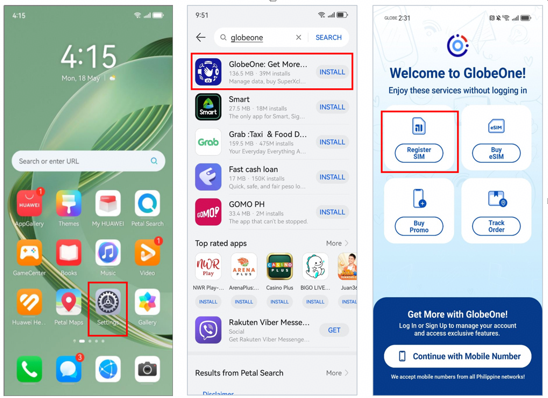

In 2026, activating a Globe SIM on a Huawei phone has become a straightforward process. Despite the absence of Google Mobile Services (GMS) on many Huawei models, Globe subscribers in the Philippines can still manage their mobile networks effortlessly. The question of How to Activate GLOBE sim on Huawei Phone is no longer a dilemma; it follows a predictable path that relies on Huawei’s Petal Search to install the official Globe app, followed by a simple in-app registration. This guide provides a detailed, step-by-step approach based on Huawei’s official community tutorial, ensuring users can register their SIM and access the network without unnecessary detours.
Is GlobeOne Safe for Activation on Huawei Devices?
Huawei device users can rest assured that installing and using GlobeOne is entirely secure. As the official application provided by Globe Telecom, GlobeOne is the most reliable tool for managing your account and registering your SIM card. By downloading it through Huawei’s Petal Search, you ensure you are getting the authentic application, avoiding the risks associated with third-party download sites. Not only does GlobeOne simplify the process for How to Activate GLOBE sim on Huawei Phone, but it also provides a complete, secure environment for inputting personal details, scanning your ID, and completing the mandatory registration required by Philippine law.
See also: Ytrishi: A Guide to Integrating Harmony and Balance into Your Life
How Petal Search Simplifies Access to Popular Apps
Using Petal Search makes accessing worldwide applications on Huawei smartphones a breeze. Since the device does not rely on the Google Play Store, Petal Search acts as a comprehensive index that pulls safe, verified applications from multiple sources. Users can download and install GlobeOne during the first setup without constantly searching for APK files online. Petal Search prevents incompatibilities and facilitates the smooth operation of the official Globe app. For Huawei smartphone owners needing to activate a Globe SIM, using Petal Search to get GlobeOne is a dependable and effective solution.
Step-by-Step Guide to Activating a Globe SIM on Huawei Phones
1.Installing GlobeOne and Creating an Account
The first practical step is to get the GlobeOne app onto your device. Open Petal Search on your Huawei phone, type “GlobeOne” into the search bar, and tap install on the official app. Once the download is complete, open the app. If you are a new user, tap the “Register” button on the welcome screen. The app will ask you to enter your mobile number. Input your 10-digit Globe number to receive a One-Time PIN (OTP) via SMS. Enter the 6-digit OTP into the app to verify your number, and then create a secure 6-digit PIN for your account. The app will then prompt you to enable biometric login, such as a fingerprint, for faster and easier access in the future.
2.Navigating the 5-Step SIM Registration Process
Once you are logged into the GlobeOne home screen, you will see a prominent banner prompting you to register your SIM. Tap this banner to begin the official 5-step registration flow. The app will display a checklist showing what is required. Tap “Continue” and select your registration type. For a physical Globe SIM, choose the option “I am a Filipino SIM holder”. You will be asked to input your mobile number again to confirm. Check the box agreeing to the terms and conditions, and tap “Continue”. The app will send another OTP via SMS; enter this code to proceed to the identity verification phase.
3.Uploading ID and Completing Personal Details
In the next step, you must verify your identity. You will be prompted to scan a valid government-issued ID and take a selfie. Follow the on-screen instructions to capture clear images. Once your identity is verified, you will proceed to fill out the registration form. Here, you need to provide your personal information, including your First Name and Last Name as they appear on your ID. You will also need to fill in other required details such as Nationality, Date of Birth, Gender, Address (including Street, Village/Subdivision, Province or State, City, and ZIP code), and Occupation. Ensure that every detail matches your submitted ID perfectly.
4.Submitting and Receiving Confirmation
After completing the form, you will be shown a summary of all the information you provided. Review it carefully to ensure there are no errors. Once everything is correct, check the final declaration box confirming that the information is true and correct. Tap “Continue” to submit your registration. The app will display a confirmation screen with a unique Reference Code. It is highly recommended to take a screenshot of this code for your records. You will also receive an SMS confirming your successful registration. After this, return to the GlobeOne home page, and your SIM is fully activated and ready for use.
Summary
How to Activate GLOBE sim on Huawei Phone is best understood as a straightforward app installation and registration routine. Start by downloading the GlobeOne app via Petal Search, create your account, and follow the built-in 5-step flow to submit your ID and personal details. By avoiding unnecessary workarounds and using official tools, Huawei users can complete their Globe SIM activation quickly, safely, and without any hassle.
